
QIP Designs User Interfaces for Adult Wellbeing Assessment
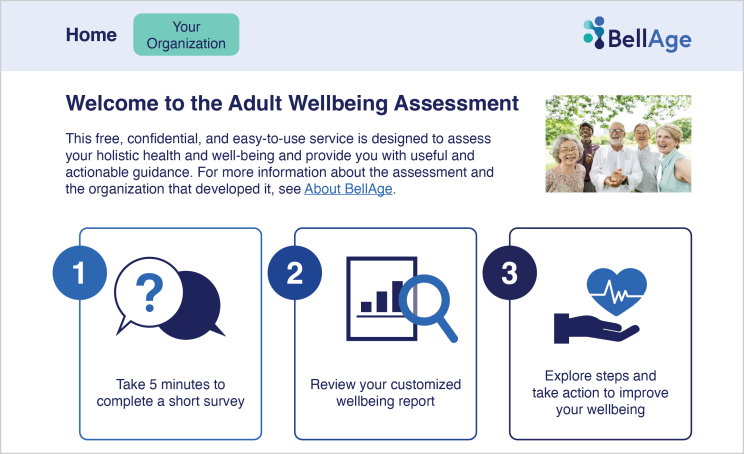
QIP had the unique opportunity to design the user interface for BellAge’s Adult Wellbeing Assessment for older adults. The assessment collects information on 13 dimensions of wellbeing, including community engagement, social supports, and physical function. Each participant receives customized recommendations based on their responses to the assessment, offering them a road map of steps to improve their score in each dimension.
Because some older adults might not be comfortable using technology or have access to internet-connected devices, we created both a paper version and an interactive, web-based version of the assessment. We knew our biggest challenge was both finding a design that worked well on both mediums but also could be completed easily by the target audience, users over the age of 65.
Design considerations when creating assessments for older adults
Accessibility and usability are key considerations when designing for any audience, but it’s especially important to understand specific issues that impact older users. Older adults may experience cognitive decline, which can affect their ability to understand and answer questions accurately. They also may have shorter attention spans, making longer assessments more difficult to complete. Vision and motor impairments can affect users’ ability to read instructions on a screen, navigate through a system, operate a computer mouse, or perform complex keyboard combinations. Motivation to complete the assessment may vary, especially for users who are less familiar with assessments.
Our solutions
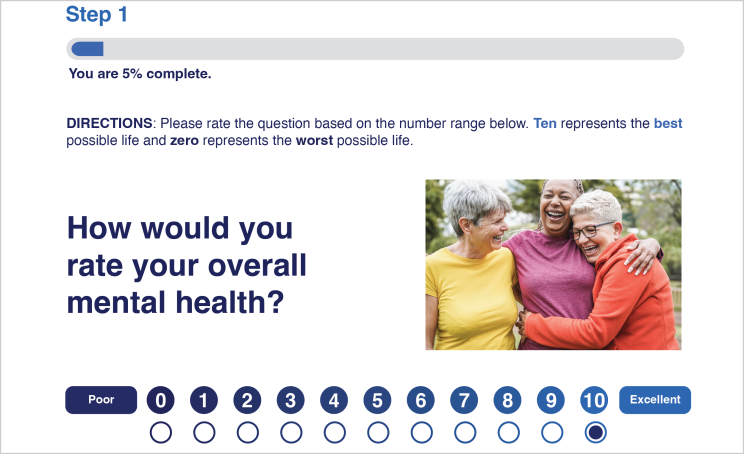
An accessible, appealing design was very important to ensure that people would complete the assessment. To ensure that older adults would enjoy the experience, it was critical to design the assessment alongside feedback from the intended audience.
We participated in a series of virtual focus groups with senior center patrons to gather feedback on both the paper-based assessment and the online user interface.
Continuous feedback and improvement led us to adjust the design in the following ways:
- Maximize accessibility. We designed the assessment with simple, clear language and visual aids to help clarify concepts. The assessment needed to have large, legible text with high color contrast and clear instructions. For the online version, we also needed to create an interface for a wide range of users with different devices—including desktop computers, tablets, and mobile phones—as well as potential differences in cognitive and physical abilities.
- Enhance usability. We created additional design elements such as a progress bar that shows the percentage of the assessment the user has completed and large navigation buttons.
- Increase engagement. We added images to the online interface that reflect people in the target demographic to illustrate the 13 dimensions of wellbeing and give users an appealing point of entry to interact with the assessment.
- Support different delivery methods. Our design team prioritized creating paper and online assessments that are equally usable so that participants have a similar experience regardless of the format.
- Provide results and feedback in visualizations. We developed engaging, informative reports to give participants results from their assessments as well as actionable information to help improve their quality of life. The assessment results use visual icons, color bars, and numbers to help users interpret their results.
Summary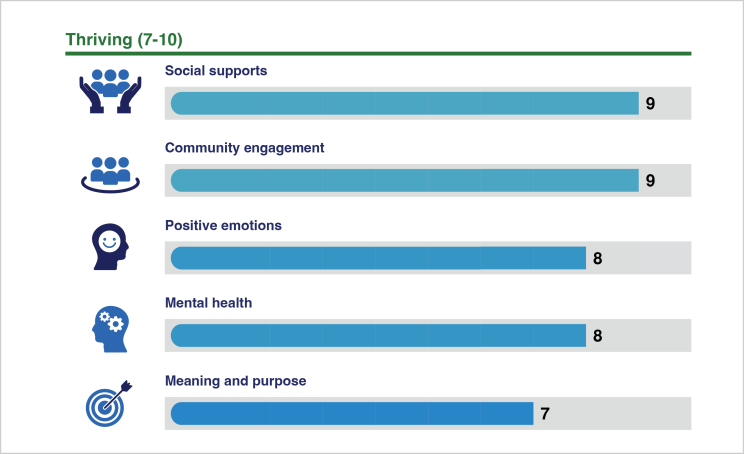
This collaboration with BellAge was QIP’s first experience developing a resource specifically for older adults. We drew on universal design and plain language principles that are important for any audience, as well as a human-centered design approach to identify and meet the needs of this particular user group. By addressing audience-specific considerations through thoughtful design and testing, we created an assessment that is accessible, effective, and user-friendly.


